Thinking about adding a smart speaker to your home? The Google Nest Mini Review shows why it could be the perfect choice for you.
This little device promises to make your life easier, from playing your favorite music to controlling your smart home gadgets. But does it really deliver on those promises? In this review, you’ll discover the real strengths and weaknesses of the Google Nest Mini.
By the end, you’ll know if it’s the right fit for your space and lifestyle. Keep reading to find out everything you need before making your decision.
Design And Build
The design and build of the Google Nest Mini play a big role in its appeal. It fits easily into many rooms without taking up much space. The device looks modern and simple, matching many home styles.
Compact Size And Aesthetics
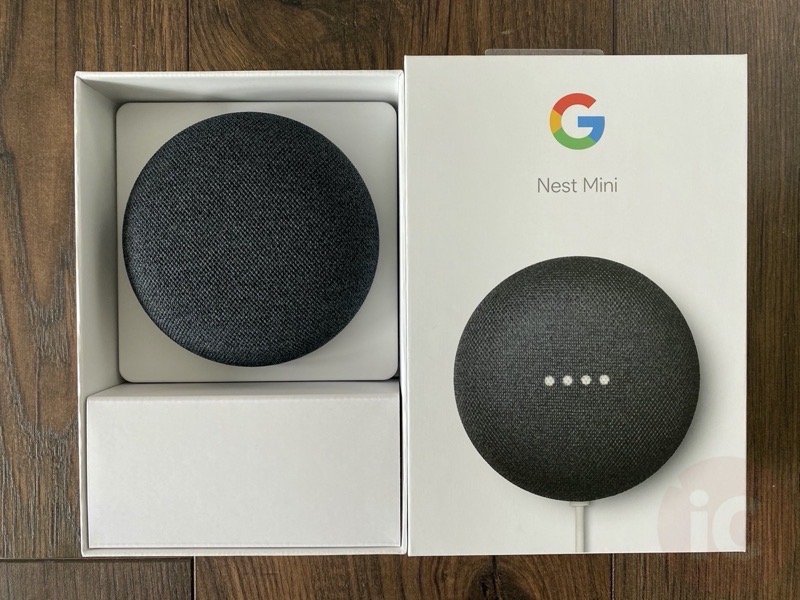
The Nest Mini is small and round, about the size of a grapefruit. Its compact shape allows it to sit neatly on shelves or desks. The fabric top adds a soft touch, making it look less like a tech gadget and more like home decor.
Material Quality
Google uses recycled plastic for the shell, supporting eco-friendly choices. The fabric cover feels smooth and durable. The materials do not feel cheap, showing good quality for its price.
Color Options
The Nest Mini comes in four colors: chalk, charcoal, coral, and sky. These colors fit various tastes and room designs. Choosing the right color helps the device blend or stand out as desired.
Credit: www.iphoneincanada.ca
Sound Performance
The Google Nest Mini delivers clear and balanced sound for its size. It fits well in small rooms and offers a good listening experience. The speaker is designed to fill the space without being too loud or distorted.
Audio Clarity
The audio clarity of the Nest Mini is impressive for a small device. Voices and instruments come through crisp and distinct. The speaker handles podcasts and audiobooks with ease. Background noise stays minimal, making speech easy to follow.
Bass And Treble Balance
The bass is deeper than in the previous model. It adds warmth without overpowering the sound. Treble sounds bright but not harsh. The balance between bass and treble feels natural. It suits casual listening and background music well.
Volume Levels
The Nest Mini reaches a surprisingly high volume. It fills a medium-sized room without distortion. Users can adjust volume smoothly with voice or touch controls. Even at low volumes, the sound remains clear and balanced.
Smart Features
The Google Nest Mini offers smart features that make life easier. It fits well into any home. The device listens and responds to your voice commands quickly. You can control music, lights, and more with simple words.
These features work together smoothly. They help you save time and stay organized. The Nest Mini uses smart technology to understand and assist you better every day.
Google Assistant Integration
The Nest Mini comes with Google Assistant built in. It answers questions and controls smart devices. You can ask for weather updates, set reminders, or play music. The assistant responds quickly and clearly. It works with many apps and services. This makes the Nest Mini very versatile for daily tasks.
Voice Recognition Accuracy
The device has good voice recognition. It hears commands even in noisy rooms. The microphones catch your voice from across the room. It understands different accents and speech patterns. This reduces errors and repeated commands. The Nest Mini keeps improving its listening skills with updates.
Multi-room Audio Support
The Nest Mini supports multi-room audio. You can connect several speakers in different rooms. Play the same music everywhere or different songs in each room. It creates a seamless sound experience throughout your home. Setting up multi-room audio is simple and quick.
Credit: loveeconomychurch.org
Setup And Usability
The Google Nest Mini Review highlights its simple setup and user-friendly design. It fits seamlessly into any home, making smart technology accessible. This section covers installation, app interface, and overall user experience for easy usability.
Installation Process
Setting up the Nest Mini takes only a few minutes. Plug it into a power source and turn it on. Download the Google Home app on your phone or tablet. Follow step-by-step instructions to connect the device to Wi-Fi. The app guides you through voice recognition and personal settings. No technical skills are needed to complete the setup.
App Interface
The Google Home app is simple and clean. It shows all your connected devices in one place. You can control the Nest Mini easily through the app. Adjust volume, set alarms, or link other smart devices. The app supports multiple languages for better understanding. It makes managing smart home functions straightforward and quick.
User Experience
The Nest Mini responds fast to voice commands. It understands common questions and commands clearly. The sound quality is good for its size. It works well in small to medium rooms. The device can play music, control lights, and provide news updates. Overall, it offers a smooth and helpful user experience.
Connectivity Options
The Google Nest Mini offers several ways to connect to your devices. Its connectivity options make it easy to use in various settings. Whether you want to stream music or control smart home gadgets, the Nest Mini stays connected with ease.
Simple connections help you get things done faster. The Nest Mini supports both Wi-Fi and Bluetooth. This lets you pick the best option for your needs.
Wi-Fi and Bluetooth
The Nest Mini connects to your home Wi-Fi network quickly. It supports 2.4 GHz and 5 GHz bands for stable and fast internet. This helps with smooth streaming and voice commands.
Bluetooth connection lets you pair the Nest Mini with other devices. You can play audio from your phone or tablet without Wi-Fi. Bluetooth range covers most rooms in a home.
Compatibility With Other Devices
The Nest Mini works well with many smart home devices. It supports Google Home ecosystem products and many third-party gadgets. You can control lights, plugs, and thermostats using your voice.
It also works with smartphones and tablets running Android or iOS. The Google Home app helps you manage all connected devices easily. This makes the Nest Mini a flexible choice for smart homes.
Privacy And Security
Privacy and security are important for smart home devices like the Google Nest Mini. Many users worry about how their data is handled and how to control the device’s listening features. This section explains how Google manages your information and what options you have to protect your privacy.
Data Handling
Google Nest Mini collects data to improve voice recognition and services. The device records your voice commands only after hearing the wake word. Google stores this data securely on its servers. You can review and delete your voice recordings anytime. The company uses encryption to protect your information from unauthorized access. Google also limits data sharing with third parties to trusted partners only.
Mute And Control Features
The Nest Mini has a physical mute button to stop the microphone. Pressing this button disables listening until you turn it back on. You can also control the device through the Google Home app. The app lets you manage privacy settings and delete recordings. These controls give you peace of mind about when the device listens. You stay in charge of your personal data and privacy at all times.
Pricing And Value
The Google Nest Mini offers smart home features at a low price. It fits well in many budgets without giving up quality. Understanding its cost and value helps decide if it suits your needs.
Cost Comparison
The Google Nest Mini costs less than many smart speakers. It is cheaper than the Amazon Echo Dot and Apple HomePod Mini. This makes it a solid choice for users on a budget. Retail price usually stays under $50. Sales and deals often lower the price further.
Value For Money
Despite its low cost, the Nest Mini delivers clear sound and smart functions. Voice commands work well, and it connects easily with other devices. It supports Google services like Assistant and Chromecast. This adds to its usefulness in daily life. The small size fits any room without taking up space. Overall, it offers good value for the price paid.
Pros And Cons
Every product has strengths and weaknesses. The Google Nest Mini is no different. Knowing its pros and cons helps in making a smart choice. Below are the key points to consider.
Pros
- Compact size fits easily in small spaces.
- Clear voice recognition even from a distance.
- Affordable price compared to other smart speakers.
- Supports multi-room audio for whole-home sound.
- Works well with many smart home devices.
- Easy setup with the Google Home app.
- Improved bass compared to the original Mini.
Cons
- Sound quality is not as rich as that of larger speakers.
- No built-in battery; requires constant power.
- Limited microphone sensitivity in noisy rooms.
- Some smart home devices may not be compatible.
- Privacy concerns for some users due to the always-on mic.
- Touch controls can be sensitive and tricky.

Credit: www.businessinsider.com
Frequently Asked Questions
What Are The Key Features Of Google Nest Mini?
Google Nest Mini offers voice control, improved sound quality, and a compact design. It supports smart home integration and hands-free help from Google Assistant. The device features wall-mount capability and enhanced bass for a better audio experience.
How Does Google Nest Mini Improve Smart Home Control?
Google Nest Mini allows voice commands to control compatible smart devices. You can adjust lights, thermostats, and security systems easily. It syncs with the Google Home app for seamless management and automation of your smart home setup.
Is Google Nest Mini Compatible With Other Google Devices?
Yes, Google Nest Mini works well with Google Home, Nest Hub, and Chromecast. It enables multi-room audio and synchronized voice commands. This compatibility creates an interconnected smart home ecosystem for convenience and efficiency.
Can Google Nest Mini Work Without Wi-fi?
No, Google Nest Mini requires a stable Wi-Fi connection to operate. It relies on internet access for voice commands, streaming music, and smart home control. Without Wi-Fi, its functionality is significantly limited.
Conclusion
The Google Nest Mini Review highlights clear audio and easy voice control. Compact and quick to set up, it integrates seamlessly with your smart home devices. Ideal for managing daily tasks and streaming high-quality music.
Its price suits many budgets. Overall, it provides solid value for those wanting a smart speaker. Simple, useful, and reliable. A smart choice for a basic home assistant.